
Short answer first: probably not. If you built links a few years ago and used the Google disavow tool as part of routine cleanup, that habit made sense at the time, but it doesn’t anymore for most sites.
The tool still exists, and Google still processes disavow files, but the guidance around it has changed enough that most website owners today should leave it alone entirely.
This guide explains exactly why that shift happened, the two specific situations where the tool is still genuinely worth using, and the safe, correct way to use it if one of those situations actually applies to you.
If you’re coming to this after years of treating disavow as a normal part of link building maintenance, you’re not alone, and you’re not wrong to notice the change. A lot of the standard advice from a few years ago simply hasn’t been updated to reflect how differently Google handles spammy links today.
What the Google Disavow Tool Actually Does
The disavow tool is a feature inside Google Search Console that lets you submit a list of backlinks and tell Google “don’t count these when you evaluate my site.”
You upload a plain text file listing specific URLs or entire domains, and Google factors that request in the next time it recrawls and reprocesses those links. According to Google’s own documentation, it’s described as “an advanced feature” that “should only be used with caution,” and Google states plainly that most sites will never need it.
Google introduced the tool in October 2012, shortly after the Penguin algorithm update started penalizing sites for manipulative link building.
Back then, a sudden pile of spammy backlinks could genuinely tank your rankings, and disavowing them was often the only way to recover. That was the environment the tool was built for.
Why It Fell Out of Favore
Two things changed since 2012 that explain the shift. First, the 2016 Penguin 4.0 update moved link evaluation from a periodic, penalty-based system into something that runs continuously in real time.
Instead of your whole site getting penalized for bad links, Google’s algorithm now simply devalues the specific spammy links it identifies, automatically, without you having to flag anything.
Second, Google’s more recent SpamBrain system extended that same automatic filtering much further. Google’s own search advocates, including John Mueller, have said repeatedly in public Search Central sessions that the tool exists mainly for a narrow, specific purpose now, and that most of the “clean up your backlink profile” advice built around it is outdated. Mueller has even said publicly that Google will likely remove the tool from Search Console at some point, precisely because so few sites still have a real reason to use it.
This lines up with what a lot of site owners have noticed themselves: a tool that used to feel like a standard part of SEO maintenance a few years ago now barely comes up at all, because it mostly isn’t needed anymore.
The Only Two Situations Where You Should Still Use It
Google’s guidance narrows this down to exactly two scenarios. Outside of these, disavowing links is more likely to hurt you than help.
- You have an active manual action: check Search Console’s Manual Actions report. If Google’s own webspam team has flagged “unnatural links to your site” specifically, that’s the clearest, most direct signal the tool is meant for.
- You have strong, specific evidence of a negative SEO attack: not a vague feeling, but a documented pattern: a sudden, concentrated spike of spammy links from low-quality or clearly artificial sources, arriving in a short window, that you can point to directly.
If neither of these applies to you, the honest answer is to leave your backlink profile alone and put that time into building new links instead.
Why Third-Party “Toxic Score” Reports Are Not a Reason to Disavow
Many popular SEO tools generate a “toxicity score” or flag links as “toxic” based on their own internal scoring models. These reports are useful for getting a general sense of your link profile, and pairing them with a proper free backlink checker is a smart habit.
But a third-party tool’s opinion of what’s “toxic” is not the same as Google’s own evaluation, and it is specifically not one of the two situations Google says warrants a disavow file.
Site owners who disavow every link a third-party tool flags as risky, without a manual action or a clear attack pattern behind it, run a real risk of stripping out links that were actually helping them.
This is one of the most common and most damaging mistakes still happening in 2026, mostly because a lot of older guides never updated this advice.
How to Check If You Actually Have a Manual Action
Before you do anything else, this is the first and only step that matters:
- Open Google Search Console for your verified property.
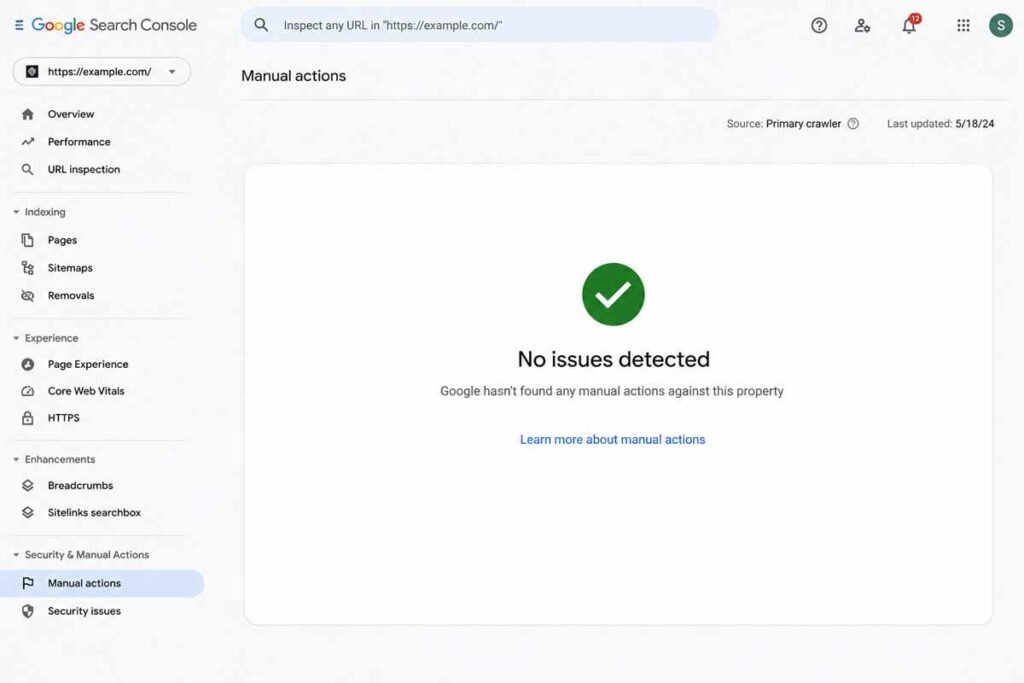
- Go to the “Security & Manual Actions” section in the left sidebar.
- Click “Manual actions.”
- If the page says “No issues detected,” you do not have a manual action, and disavowing links is very unlikely to help you right now.
- If you see an entry mentioning unnatural links (either “to your site” or “from your site”), that’s your genuine signal to consider a disavow file.
If You Genuinely Need to Disavow: The Correct Process
If you’ve confirmed a real manual action or a clear negative SEO pattern, here’s how to do it correctly.
1. Build your list carefully
Pull your current backlink data from Search Console’s own Links report first, since that reflects Google’s actual index rather than a third-party crawler’s estimate. Cross-reference with a free backlink checker tool if you want a second opinion, but treat Search Console as the source of truth for your own site.
2. Format the file exactly right
The disavow file is a plain .txt file, encoded in UTF-8 or 7-bit ASCII, with one URL or domain per line. To disavow an entire domain instead of a single page, prefix it with “domain:”, for example domain:example.com.
You cannot disavow an entire subpath, only specific URLs or full domains. Lines starting with a # symbol are treated as comments and ignored by Google, which is useful for leaving yourself notes about why each entry was added.
3. Prefer specific URLs over whole domains when possible
If only one page on an otherwise legitimate site is linking to you strangely, such as a spam comment or a hacked forum post, disavow that specific URL rather than the entire domain. Reserve the domain-level disavow for sites that are clearly built entirely for spam, like a private blog network or an obvious link farm.
4. Upload it and be patient
Submit the file through the disavow tool page linked from Search Console. Google needs to recrawl the affected pages before the disavow takes effect, which typically takes several weeks. Uploading a new file completely replaces your previous one for that property, so keep a saved backup copy of your current list before making changes.
5. Don’t touch it again too soon
Once submitted, resist the urge to keep tweaking the file every few days. Let Google finish recrawling and reprocessing before you make further changes, and monitor your Manual Actions report and organic traffic over the following weeks rather than reacting immediately.
A Real Disavow File, So You Can See the Format
Reading the formatting rules in the abstract is harder than just looking at a real example. Here’s what a correctly formatted disavow file actually looks like:
# Spam comments and paid links found in March 2026 audit http://spam-example.com/stuff/comments.html http://spam-example.com/stuff/paid-links.html # Entire domain confirmed as a private blog network domain:shadyseo-example.com domain:linkfarm-example.net
Notice the comment lines starting with # explaining why each entry was added. Six months from now, when you’ve forgotten the specifics, those notes save you from having to re-investigate every line before making a change. Google ignores anything after a # symbol entirely, so these comments exist purely for your own record-keeping.
What a Genuine Negative SEO Attack Actually Looks Like
This term gets thrown around loosely, so it’s worth being specific about what actually qualifies as evidence, rather than just a bad feeling about your link profile. A real, documentable negative SEO pattern usually has most of these characteristics at once:
- A sudden spike in referring domains over a short window, days or a couple of weeks, rather than a gradual accumulation over months.
- Links concentrated on obviously low-quality or unrelated domains: foreign-language gambling sites, adult content, or pages with no real content at all.
- Anchor text that’s aggressively keyword-stuffed or completely unrelated to your actual content, which is unusual for organic link building.
- A pattern that lines up suspiciously with a specific event, like a competitor dispute, a public disagreement, or a sudden ranking drop with no other explanation.
A handful of odd-looking links trickling in slowly over months, from an otherwise unremarkable mix of sites, almost never meets this bar. That’s normal background noise every website accumulates, and it’s precisely the kind of thing Google’s algorithm is already built to filter out on its own.
Domain Properties vs. URL-Prefix Properties: A Quirk Worth Knowing
One technical detail trips up a surprising number of people attempting this for the first time. The disavow tool historically has not supported Domain properties in Search Console the same way it supports URL-prefix properties.
If your site is verified as a Domain property (covering all subdomains and protocols under one entry) rather than a specific URL-prefix property, you may need to verify a matching URL-prefix property separately before you can submit a disavow file at all.
Check which property type you’re working with before you spend time building a disavow list, since discovering this mismatch after the fact is a common and avoidable frustration.
A Simple Decision Checklist Before You Do Anything
If you’re still unsure whether any of this applies to you, work through these questions in order. Stop at the first “no” and you almost certainly don’t need to disavow anything right now.
- Have you checked Search Console’s Manual Actions report in the last 30 days, and does it show an active unnatural-links action? If no, stop here.
- If yes: can you identify the specific links causing it, either from the manual action message itself or from a recent backlink export? If no, request more detail through the reconsideration process before building a disavow file blind.
- Have you first tried to get the offending links removed directly, by contacting the linking site? Google explicitly expects this as a first step before disavowing, not a courtesy you can skip.
- If removal isn’t possible or isn’t working: have you built your disavow list from Search Console’s own data, not solely a third-party tool’s toxicity score? If no, go back and verify against your Links report first.
Only once you’ve answered yes through this full sequence does uploading a disavow file actually make sense. Skipping straight to the upload step because a spam score looked alarming is exactly the pattern that leads to accidentally removing links that were helping you.
Why Different Tools Disagree About What’s “Toxic”
It’s worth understanding why one tool might flag a link as dangerous while another shows nothing wrong with it at all, since this inconsistency is itself part of why third-party toxicity scores shouldn’t drive your disavow decisions.
Every backlink tool, Ahrefs, Semrush, Moz, and the rest, builds its own scoring model based on its own crawled data and its own assumptions about what patterns look spammy.
None of these models are built by Google, none of them see Google’s actual ranking signals, and none of them can see whether a specific link has triggered, or is likely to trigger, an actual manual action.
A link that one tool scores as high-risk might be completely invisible to Google’s own systems, and a link Google’s algorithm has already silently devalued might still show up looking perfectly normal in a third-party report. Treat these scores as a rough starting point for investigation, never as a final verdict.
What to Do Instead, Most of the Time
For the vast majority of sites reading this, the better use of your time is watching your backlink profile through a free backlink checker periodically, checking your Manual Actions report every so often just to confirm it’s still clear, and putting your real effort into building new, relevant backlinks.
A strong, growing link profile naturally dilutes the impact of the occasional spammy link far more effectively than reactive disavowing ever did.
If you’re unsure whether something you’re seeing counts as spammy or not, the practical test Google itself points to is simple: would this pattern of links realistically trigger a manual action from Google’s webspam team? If the honest answer is no, it’s not worth touching.
Common Mistakes to Avoid
- Disavowing links just because a third-party tool labeled them “toxic,” without a manual action or real attack pattern behind it.
- Disavowing an entire domain when only one specific page was actually the problem.
- Re-uploading a new file every few days out of anxiety instead of waiting for Google to process the previous one.
- Treating disavowing as a routine, ongoing maintenance task rather than a rare, specific-situation tool.
- Forgetting that a domain-property disavow file doesn’t currently work the same way as it does for URL-prefix properties, so double-check which property type you’re using in Search Console before uploading anything.
FAQ
Is the Google disavow tool still available in 2026?
Yes. It still exists inside Google Search Console and Google still processes submitted disavow files. However, Google’s own guidance says most sites don’t need it anymore, and there have been public comments from Google suggesting it could eventually be removed since so few sites have a genuine use for it.
Do I need to disavow backlinks if a tool shows my toxic score is high?
Not automatically. A high toxicity score from a third-party tool isn’t the same as Google flagging those links itself. Unless you also have a genuine manual action in Search Console or clear evidence of an active negative SEO attack, disavowing based on a third-party score alone is more likely to hurt than help.
How long does it take for a disavow file to work?
Typically several weeks, sometimes longer. Google needs to recrawl the disavowed pages before it updates how it evaluates those links against your site, so results aren’t immediate.
Can disavowing links hurt my rankings?
Yes, if done incorrectly. Disavowing links that were actually contributing positively to your site, based on a mistaken belief they were harmful, removes real ranking signal you didn’t need to give up. This is why Google explicitly calls it an advanced feature meant to be used with caution.
What’s the difference between a manual action and an algorithmic link penalty?
A manual action is a specific flag applied by a person on Google’s webspam team, visible directly in your Search Console Manual Actions report. Algorithmic devaluation, by contrast, happens automatically and silently through systems like SpamBrain, with no report or notification telling you it happened, since the algorithm is simply discounting the link’s value rather than penalizing your whole site.
Should I hire someone to do a disavow audit for me?
Only if you’ve already confirmed a manual action or a genuine attack pattern first. Paying for a disavow audit on a site with no manual action and no unusual link spike is paying to solve a problem that, according to Google’s own guidance, likely doesn’t exist.
Why doesn’t the disavow tool show up under my Domain property in Search Console?
The disavow tool has historically not supported Domain properties the same way it supports URL-prefix properties. If you only have a Domain property verified, you may need to verify a separate URL-prefix property for your site before you’re able to submit a disavow file.
Will Google eventually remove the disavow tool completely?
It’s possible. Google’s John Mueller has said publicly, across multiple Search Central sessions, that the tool could eventually be phased out, given how few sites have a genuine need for it now that algorithmic systems like SpamBrain handle most spammy link devaluation automatically.
What should I do if I ran a disavow file a few years ago and I’m not sure it’s still needed?
Check your current Manual Actions report first. If it shows no issues and the situation that originally justified the disavow file (a manual action, or a confirmed attack) has been resolved for a while, there’s generally no urgent need to remove your old disavow file, but there’s also no need to add anything new to it unless a fresh, specific issue comes up. Leaving a settled, resolved disavow file in place rarely causes ongoing harm.



One point worth stressing is that Google says it mostly ignores spammy links on its own, so disavowing makes the most sense after a manual action or a clear paid-link pattern. For everyone else, would regular backlink audits be a better use of time than uploading a file?