
If you’ve ever pasted your own domain into a backlink checker and felt more confused than informed by the numbers looking back at you, you’re not alone.
Backlink data is one of the most misunderstood corners of SEO for beginners, not because the tools are complicated, but because most guides throw metrics at you (DA, DR, Trust Flow, spam score) without explaining what any of it actually means for your rankings.
This guide breaks down the best free backlink checker tools available in 2026, what each one actually shows you, and, more importantly, how to read that data without getting lost in numbers that don’t matter.
Whether you’re checking your own site for the first time or trying to understand why a competitor outranks you, you don’t need a paid subscription to get started.
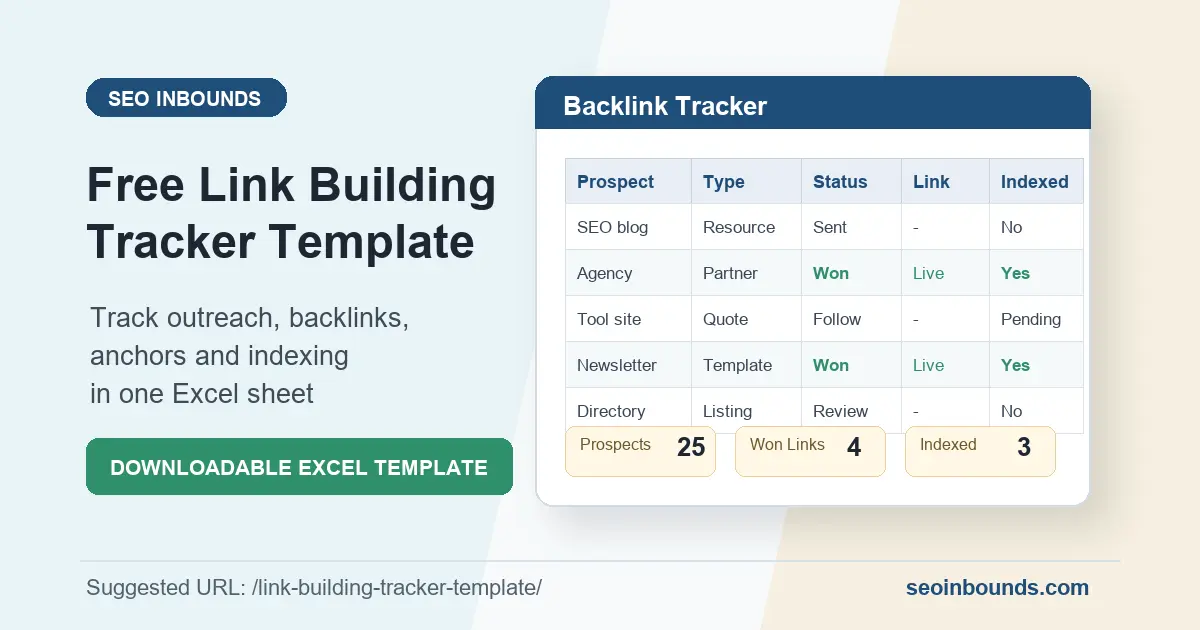
If you’re building links as part of a broader strategy, pair this guide with our Off-Page SEO Checklist and our free Link Building Tracker Template both are designed to work alongside the tools below.
What Is a Backlink Checker and Why Beginners Need One
A backlink checker is a tool that scans a search engine’s link index (or its own independently crawled index) and reports every website it has found linking back to a specific URL or domain.
In plain terms: you type in a website address, and the tool tells you who is linking to it, how many links exist, and what those links look like.
For beginners, a free backlink checker tool serves three practical purposes.
First, it lets you see your own current backlink profile so you know your starting point before you begin any link-building campaign.
Second, it lets you check competitors to understand where they’re getting their links from, often revealing directories, guest post opportunities, or resource pages you hadn’t considered.
Third, and often overlooked, it helps you catch problems early: broken links pointing to pages that no longer exist, or suspicious-looking links from spammy domains that could be dragging your site down rather than helping it.
Those same broken links, when found on someone else’s site instead of your own, are also the entire foundation of broken link building one of the more reliable free link-building tactics still working in 2026.
None of this requires a paid tool to start. The free tier of a handful of well-established platforms, plus one tool nearly everyone already has access to and doesn’t use for this purpose, will cover almost everything a beginner or small site owner needs.
What Metrics a Backlink Checker Actually Shows You
Before comparing tools, it helps to understand what you’re actually looking at once you run a check. Every backlink checker tool reports some version of the following:
- Referring domains: the number of unique websites linking to you (more meaningful than total backlink count, since 50 links from one spammy site matter far less than 5 links from 5 reputable ones)
- Domain Authority / Domain Rating: a third-party estimate (not a Google metric) of how strong a domain’s overall link profile is, usually scored 0–100
- Anchor tex: the clickable text used in the link; useful for spotting whether your link profile looks natural or overly optimized
- Dofollow vs. nofollow: whether the link passes SEO value directly, or is tagged to tell search engines not to count it as a ranking signal
- Spam score / toxicity: an estimate of how likely a linking domain is to be part of a link farm, private blog network, or otherwise low-quality source
It’s worth being clear about one thing up front: Domain Authority, Domain Rating, and Trust Flow are all third-party metrics, invented by Moz, Ahrefs, and Majestic respectively.
Google does not use any of them directly in its ranking algorithm. They’re useful as a rough, comparative signal (a DR 70 site is very likely stronger than a DR 15 site), but they are estimates, not ground truth.
The only backlink data that reflects exactly what Google itself has indexed for your site comes from Google Search Console, which is why it deserves a section of its own below.
Best Free Backlink Checker Tools for Beginners in 2026
Here’s how the most widely used free backlink checker tools compare, based on what each currently offers without a paid plan:
| Tool | Free Access | Best For | Signup Required |
| Google Search Console | Full backlink data for your own verified site | First-party, 100% accurate data | Yes (free, one-time) |
| Ahrefs Free Backlink Checker | Top 100 backlinks per domain/URL | Quick competitor snapshots | No |
| Moz Link Explorer | 10 queries per month, ~50 rows per query | Domain Authority scoring | Yes (free account) |
| Majestic Site Explorer | Rotating free sample data on select sites | Trust Flow / Citation Flow metrics | No for basic lookup |
| Ubersuggest | Limited backlink data per day | Beginners wanting a simple dashboard | Free account recommended |
1. Google Search Console (Most Accurate for Your Own Site)
Google Search Console is the only tool on this list that shows you exactly what Google has indexed for your site, not an estimate, not a sample, the real data. Once your site is verified, the Links report shows your top linked pages, top linking sites, and top anchor text, completely free, with no query limits.
The limitation is that Search Console only shows data for domains you own and have verified, you can’t use it to check a competitor’s backlink profile. That’s where the other tools on this list come in.
2. Ahrefs Free Backlink Checker
Ahrefs runs one of the largest and most frequently updated link indexes of any SEO tool. Its free backlink checker requires no signup at all, paste in any domain or URL and it returns the top 100 backlinks, along with Domain Rating and referring domain counts.
For a beginner doing a quick competitor check or a first look at their own site, 100 backlinks is usually more than enough to spot patterns.
The tradeoff is depth: if a site has thousands of backlinks, you’re only seeing a curated top slice, not the full picture. For that, Ahrefs’ paid plans (or the alternatives below) go further.
3. Moz Link Explorer
Moz popularized the Domain Authority metric, and its free Link Explorer account gives you 10 queries per month with roughly 50 rows of backlink data per query. That’s a meaningful cap, so it’s best used deliberately, save your free queries for your own site and one or two direct competitors rather than casual browsing.
Moz’s data is particularly useful if you already think in terms of Domain Authority, since it’s the original source of that metric and tends to be the most consistent reference point across other tools that also report DA.
4. Majestic Site Explorer
Majestic takes a different approach from DA/DR, its signature metrics are Trust Flow and Citation Flow, which separate link quantity (Citation Flow) from link quality based on proximity to trusted sites (Trust Flow).
Majestic offers rotating free sample data on selected sites without requiring signup, making it a useful second opinion alongside Ahrefs or Moz rather than a primary tool for beginners.
5. Ubersuggest
Ubersuggest is aimed squarely at beginners and small site owners, with a simpler dashboard than Ahrefs or Moz and a free tier that includes basic backlink data.
Because free daily limits on tools like this change fairly often, it’s worth checking the current allowance directly on the platform before relying on it for a specific workflow, but as a low-friction starting point for someone who’s never checked a backlink profile before, it’s one of the more approachable options available.
Google Search Console vs. Third-Party Backlink Checkers: Which Should You Trust?
This is one of the most common points of confusion for beginners, so it’s worth answering directly: for your own website, Google Search Console should always be your first and most trusted source.
Third-party tools like Ahrefs, Moz, and Majestic maintain their own independent web crawlers, they are not looking at Google’s actual index, they’re building an approximation of it based on what their own crawler has found.
That approximation is genuinely useful, it’s often the only way to see a competitor’s backlinks at all, since you obviously can’t access their Search Console account, but it will never perfectly match what Google itself has indexed for a site.
Discrepancies between what Ahrefs shows and what Search Console shows for your own domain aren’t a bug in either tool; they’re simply the result of two different crawlers seeing different (overlapping but not identical) slices of the web.
Practical takeaway: use Search Console to verify your own backlinks are real and indexed, and use the third-party tools above to research competitors or discover new link opportunities. If you’re tracking links you’re actively building, log them in a link building tracker so you’re not relying on any single tool’s memory.
How to Check If a Backlink Is Actually Live and Indexed
Getting a link published is only half the job, a link that’s live on a page but never gets crawled and indexed by Google passes no SEO value at all. Here’s the beginner-friendly process for confirming a backlink is actually working:
- Visit the page directly and confirm the link is present and pointing to the correct URL (not a redirect, not a typo’d domain)
- Check whether the link is dofollow or nofollow by viewing the page source (Ctrl+U or Cmd+Option+U) and searching for your domain — a nofollow link will have rel=”nofollow” in the anchor tag
- Search Google for the exact linking page URL using the site: operator (for example: site:example.com/your-post) to confirm Google has indexed that page at all
- Run the target domain through a free backlink checker tool a few weeks after publication — if the link shows up there, it’s been crawled and counted
- For high-priority links, check Search Console’s Links report periodically to see if the referring domain appears in your own verified data
A link that hasn’t shown up anywhere after 4-6 weeks isn’t necessarily dead, indexing can be slow, especially on lower-authority sites — but it’s worth flagging in your tracker for a follow-up check rather than assuming it’s working.
Common Backlink Checker Mistakes Beginners Make
1. Treating Domain Authority as the Only Metric That Matters
DA and DR are useful shorthand, but a link from a lower-DA site that’s genuinely relevant to your niche is often more valuable than a high-DA link from a completely unrelated industry. Relevance and context matter as much as the number.
2. Not Checking Indexing Status Separately
As covered above, a link existing on a page is not the same as Google having crawled and counted it. Beginners often stop at ‘I can see my link on their site’ without confirming the page is indexed at all.
3. Ignoring the Dofollow vs. Nofollow Distinction
Nofollow links still have value, for referral traffic, brand visibility, and diversifying a natural-looking link profile, but they don’t pass direct SEO authority the way dofollow links do. Counting every backlink as equally valuable skews your understanding of your actual link equity.
4. Checking Once and Never Again
A backlink profile isn’t static. Links get removed when sites redesign, articles get deleted, and directories go offline. Checking only when you first build a link, then never again, means you won’t notice when links quietly disappear months later.
5. Confusing a High Backlink Count With a Healthy Backlink Profile
A site with 40 backlinks from 40 different, relevant, reputable domains is in a stronger position than a site with 400 backlinks concentrated across five spammy directories. Referring domain diversity matters more than raw volume.
Free vs. Paid Backlink Checkers: Do You Need to Upgrade?
For most beginners and small site owners, the honest answer is: not yet. The free tools covered in this guide, especially Google Search Console combined with Ahrefs’ no-signup checker, cover the core use cases of checking your own site and getting a snapshot of a competitor’s top links.
Paid tools become genuinely necessary once you’re managing backlinks at scale: agencies tracking dozens of client sites, sites actively running large outreach campaigns needing full (not top-100) backlink exports, or anyone who needs historical trend data going back months or years.
If you’re publishing a handful of links a month and checking in periodically, the free tier of these tools will keep pace with you for quite a while before you hit a real ceiling.
Using a Free Backlink Checker Tool When Your Site Has Zero Backlinks
If you’re checking a brand-new website and every free backlink checker tool comes back empty, that’s completely normal and not a sign anything is broken.
New domains typically have no backlinks at all until you actively start building them, no free backlink checker tool can show you data that doesn’t exist yet.
What’s worth doing at this stage is running your own domain through two or three tools (Ahrefs’ free checker plus Google Search Console) just to confirm the site is at least indexed and reachable.
An empty backlink report combined with a site that also isn’t showing up in Search Console’s coverage report points to an indexing problem worth fixing before you invest time in link building.
An empty backlink report on a site that’s indexed and healthy just means it’s time to start working through a structured plan, this is exactly where a resource like our guide on how to build backlinks for free becomes useful, since it walks through the actual link-building steps a backlink checker will later confirm are working.
What to Do With Your Backlink Checker Results (Beyond Just Looking)
Running a check and closing the tab is the single most common way beginners waste the value of a free backlink checker tool. The data is only useful if you act on it. Once you have a report in front of you, there are three concrete next steps worth taking every time:
- Flag any referring domain with an unusually high spam score or from an unrelated, low-quality niche, these are candidates for a disavow request if they keep multiplying
- Note any high-authority site linking to a competitor but not to you, these are your next outreach targets. Running a full backlink gap analysis.
turns this single observation into a repeatable process for finding them. - Record every confirmed backlink (yours or a target you’re pursuing) in a simple tracker, rather than relying on memory or re-running the same tool repeatedly
This is exactly the workflow our free link building tracker template is built around, it gives you columns for exactly this: source, anchor text, live status, and indexing status, so your backlink checker results turn into an actual plan instead of a one-time snapshot.
How Often Should You Check Your Backlinks?
If you’re actively building links, submitting to directories, publishing guest posts, running outreach, a monthly check is a reasonable baseline. This is frequent enough to catch problems (a link that never got indexed, a removed listing) without becoming a time sink.
If your site isn’t in an active link-building phase, a quarterly check is usually sufficient, mainly to confirm nothing has quietly broken or been removed.
The exception is if you notice a sudden, unexplained ranking drop, that’s a good trigger for an immediate backlink check, since a mass loss of referring domains (or a spike in spammy new links you didn’t build) is one possible explanation worth ruling out.
Final Thoughts
You don’t need an expensive subscription to understand where your site stands. Start with Google Search Console for your own verified data, layer in Ahrefs’ free checker for a no-signup competitor snapshot, and use Moz or Majestic when you want a second opinion on Domain Authority or Trust Flow.
Log what you find in a link building tracker so the data doesn’t just live inside a tool’s dashboard, and pair your checks with the broader off-page SEO checklist if you’re building your link profile from scratch.
Frequently Asked Questions About Free Backlink Checker Tools
Is there a completely free backlink checker tool?
Yes. Google Search Console is entirely free for your own verified website and shows Google’s actual indexed backlink data. Ahrefs also offers a free backlink checker with no signup required, showing the top 100 backlinks for any domain.
Which free backlink checker tool is most accurate?
For your own site, Google Search Console is the most accurate, since it reflects Google’s actual index rather than a third-party crawler’s approximation.
For checking other websites, no free tool is perfectly accurate, each maintains its own independent index, so cross-checking two or three tools gives a more complete picture than relying on one.
Can I check a competitor’s backlinks for free?
Yes. Ahrefs’ free backlink checker requires no account and works on any public domain, making it one of the fastest ways to get a snapshot of a competitor’s top backlinks and Domain Rating without signing up for anything.
Do free backlink checkers show nofollow links?
Most do, including Ahrefs, Moz, and Majestic’s free tiers, they typically indicate whether each link is dofollow or nofollow. This distinction matters because nofollow links don’t pass direct SEO authority, even though they can still contribute referral traffic and visibility.
How often should I check my backlinks?
Monthly if you’re actively building links, quarterly if your site is stable and you’re mainly monitoring for lost or broken links. A sudden ranking drop is also a good trigger for an unscheduled check.
Why does a backlink checker show different numbers than another tool?
Each backlink checker tool, Ahrefs, Moz, Majestic, and others, maintains its own independent web crawler and index. None of them see the exact same slice of the internet, and none of them see exactly what Google itself has indexed either.
This is expected and is not a sign that one tool is broken; it’s why cross-checking a couple of tools, alongside Google Search Console for your own site, gives a more reliable picture than trusting any single source.
Thank you for sharing this free backlink checker tools.