Every link you click has two parts: where it goes, and the words you click on. Those words are called anchor text, and they are one of the oldest ideas in SEO.
Here is the honest version for 2026. Anchor text still matters. It tells readers what to expect, and it gives search engines context about the page on the other side. But the old trick of using your exact keyword as the anchor text everywhere is now a good way to look manipulative. Google says so in its own guidance.
This guide explains what anchor text is, walks through each type with examples, gives you a realistic anchor text ratio (with the honest warning that nobody has an official one), and shows you how to audit your own links for free. It is written for beginners, but if you have been building links for years, the audit and over-optimization sections are worth your time.
What Is Anchor Text?
Anchor text is the clickable, visible text of a link. On most websites it is the blue or underlined words you can click. Google also calls it link text. If you are searching for “what is anchor text,” the short answer is this: it is the part of a link that people read.
Behind the scenes, a link is a small piece of HTML called an anchor element. It has an address (the href) and some text. Here is what that looks like:
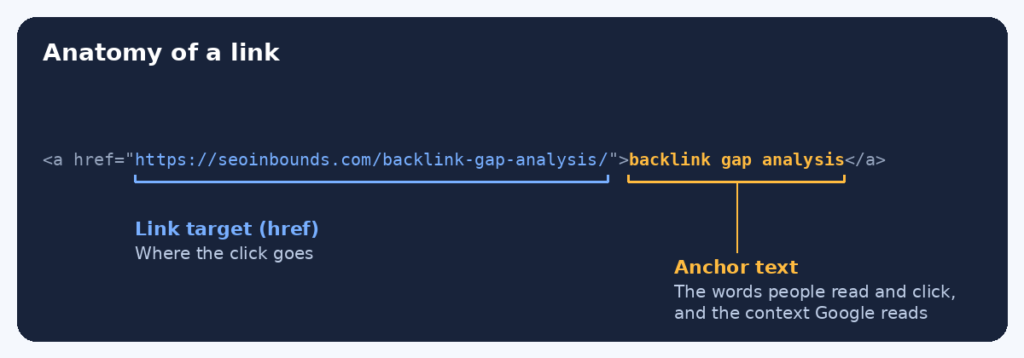
Two details are worth knowing. First, Google can only follow a link if it is a proper anchor element with an href. Links built in odd ways may not be found. Second, when the link is an image, Google uses the image’s alt text as the anchor text. So an image link with no alt text gives Google almost nothing to work with.
Why anchor text matters
Anchor text does two jobs. For readers, it sets an expectation before the click. For search engines, it adds context about the page you are linking to. Google’s own link best practices say good anchor text is descriptive, reasonably short, and relevant both to the page it sits on and to the page it points to.
Does anchor text still matter in 2026? Yes, but not in the way old SEO advice suggests. It is a context signal, not a ranking button. You cannot push a page up by repeating a keyword in link after link. What you can do is make your links clear to people, and keep the overall pattern of your links looking natural.
Anchor Text Types (With Examples)
Once you know the anchor text types, auditing a link profile becomes much easier, because every link fits one of a few boxes. Here are the main ones, with anchor text examples for a link to a backlink gap analysis page:
Type | Example (linking to a backlink gap analysis page) | What it tells people and Google | Risk |
Exact match | backlink gap analysis | The words match the target keyword exactly | Fine in small amounts; risky when overused |
Partial match | how to run a backlink gap analysis for free | The keyword plus extra words | Low |
Branded | SEO Inbounds | Names the site that owns the page | Very low |
Naked URL |
| The web address shown as text | Very low, but gives little context |
Generic | click here, read more, this guide | No topic words at all | Low, but wastes the chance to add context |
Image | Alt text of a linked image | Google reads the alt text as the anchor text | Low if the alt text is descriptive |
Empty | No visible text and no alt text | Nothing for readers or crawlers | Fix these |
Exact match anchor text
The anchor is the exact keyword you want the page to rank for. If a page targets “backlink gap analysis,” an exact match link reads “backlink gap analysis.” It is clear, but it is also the easiest type to overdo. We cover it in its own section below.
Partial match anchor text
The anchor contains your keyword inside a longer, natural phrase, like “how to run a backlink gap analysis for free.” Partial match anchors read like normal writing and give strong context, which is why they are usually the safest keyword-style option.
Branded anchor text
The anchor is the name of the site or company, like “SEO Inbounds.” Branded anchor text is the most common type in natural link profiles. When writers mention a source, they usually name it.
Naked URL anchors
The anchor is the address itself, such as https://seoinbounds.com. These appear all the time when people paste a link into a post or a comment. They are natural, but they say little about the page.
Generic anchors
Words like “click here,” “read more,” or “this guide.” They are fine now and then, especially in backlinks you do not control. On your own site, you can do better. A descriptive link helps screen reader users too, since many of them jump from link to link and hear only the link text.
Image anchors
A linked image uses its alt text as the anchor. Write that alt text as if you were describing where the link goes, not as a place to stuff a keyword.
Anchor Text Ratio: What Is a Natural Mix?
This is the question everyone asks, so here is the honest answer first. Google has never published an official anchor text ratio. Every percentage you see online is someone’s estimate, usually from a sample of sites they studied. They do not agree with each other, and none of them is a rule.
That said, the estimates point the same way. When we compare several SEO sites that publish ranges, the pattern is steady. Branded anchors are the biggest slice. Naked URLs and generic anchors come next. Partial match is smaller, and exact match is the smallest.
Anchor type | Rough range quoted by SEO sites | Note |
Branded | About 30% to 50% | The biggest slice in most natural profiles, because people link by name |
Naked URL | About 10% to 25% | Common when people paste a web address as the link |
Generic | About 10% to 20% | Words like “this article” or “learn more” |
Partial match | About 8% to 22% | Descriptive phrases that include your topic |
Exact match | About 3% to 10% | The smallest slice; some sources start warning at 10% to 15% |
Treat those ranges as a rough picture of what a natural profile looks like, not a target to hit. They come from different studies with different data, and they describe backlinks from other sites. They do not apply to internal links, where you control the text.
Here is why the pattern makes sense. When real people link to you without being asked, they usually write your name, paste your address, or type something like “this article.” Very few people craft a keyword-rich phrase unless someone asked them to. So a profile packed with exact match anchors looks like someone engineered it.
A practical way to use ratios: compare yourself to the sites that already rank for your keywords. If you run a backlink gap analysis, you will already have competitor backlink data in front of you. Check what their anchors look like. If your exact match share is far above theirs, that is worth a closer look.
Exact Match Anchor Text: When It Helps and When It Hurts
Exact match anchor text used to be the main lever in link building. Google’s early algorithm leaned heavily on it, so SEOs built thousands of links with the same keyword. Then Google’s Penguin update, first launched in 2012, started going after manipulative link patterns. It later became a real-time part of Google’s core system, and spam systems like SpamBrain now work to neutralize unnatural links automatically.
So is exact match anchor text bad? No. It is a problem only when it is forced or repeated. A few things are normal and fine:
- An editor links to your page with your keyword as the anchor because that is simply what the page is about.
- You use a short, exact phrase for an internal link on your own site.
- A natural mix of anchors includes an occasional exact match.
What gets people in trouble is asking for the same keyword anchor again and again. Google’s spam policies list links with optimized anchor text in articles, guest posts, or press releases distributed on other sites as an example of link spam. That does not ban guest posts or press releases. It means you should not use them to push keyword-rich links.
If you publish through free guest posting sites or press release submission sites, use your brand name, your page title, or a plain description as the anchor. It looks natural, and it keeps you well away from that example.
Over Optimized Anchor Text: How to Spot It and Fix It
Over optimized anchor text means too many of your links use the same keyword-rich phrase, in a way that looks planned instead of natural. Here are the warning signs:
- One exact match phrase makes up a large share of your backlinks, well above the ranges in the table above.
- Branded anchors are rare, while commercial keyword anchors are common.
- Many new links arrive in a short window, and most use the same anchor.
- Anchors do not match the pages they sit on, such as a keyword link inside a post about something unrelated.
- The same phrase shows up across low-quality sites, paid posts, or distributed articles.
None of these alone proves a problem. Google has not said any particular percentage triggers action. But together they describe the kind of pattern that spam systems look for.
How to fix over optimized anchor text
- Stop adding to the pattern. Use branded, partial match, or descriptive anchors for new links from now on.
- Edit what you control. If you wrote the guest posts, profiles, or listings, change the anchors yourself.
- Ask politely where it is worth the effort. For a few high-quality sites, a short email asking to adjust the link text can work. Do not expect everyone to agree.
- Dilute the pattern with real links. Earning more natural, varied links gradually shifts the mix back to normal.
- Check Search Console for a manual action before doing anything drastic.
A warning on that last point. Many people jump straight to disavowing links because their anchors look unbalanced. In most cases that is not needed, and it can remove links that were helping you. Our guide to the Google disavow tool explains when it is actually worth using.
Anchor Text Best Practices for Internal and External Links
These anchor text best practices follow Google’s own guidance, plus common sense. They apply to links on your site and to links you ask others to write.
- Be descriptive. Someone should be able to guess where the link goes without reading the sentence around it.
- Keep it short. A few words is usually enough. A whole sentence as a link is hard to read.
- Stay relevant. The anchor should fit the page it sits on and the page it points to.
- Do not force keywords. Google warns that if you feel you are forcing keywords in, you have probably gone too far.
- Do not stack links together. Links jammed side by side make it hard for readers to tell them apart and leave each one without surrounding context.
- Write alt text for image links. It works as the anchor text.
- Use real links. A link should be an anchor element with an href, not text that only looks like a link.
Internal link anchor text best practices
Internal links are where you have the most control, so use it. Describe the target page in plain words, and vary the wording a little instead of repeating the same phrase every time. Do not point the same anchor text at different pages, since that blurs which page you mean. Our guide on internal linking for indexing shows how internal links help new pages get found.
For internal links, fairly direct anchors are normal. A link that says “free backlink checker tools” is better for a reader than “click here,” and it is not manipulation, because you are simply helping people move around your own site.
Is “click here” bad anchor text?
It is not harmful in a penalty sense, but it is a missed chance. It tells readers nothing, it tells search engines nothing, and it works poorly for screen readers. Replace it with the topic of the page whenever you can.
Anchor Text Optimization: A Simple Free Audit
Anchor text optimization sounds technical, but a basic audit takes less than an hour and needs no paid tools. The goal is to see what your anchor text mix looks like today. Here is how to check anchor text for free.
Step 1: Export your anchor text
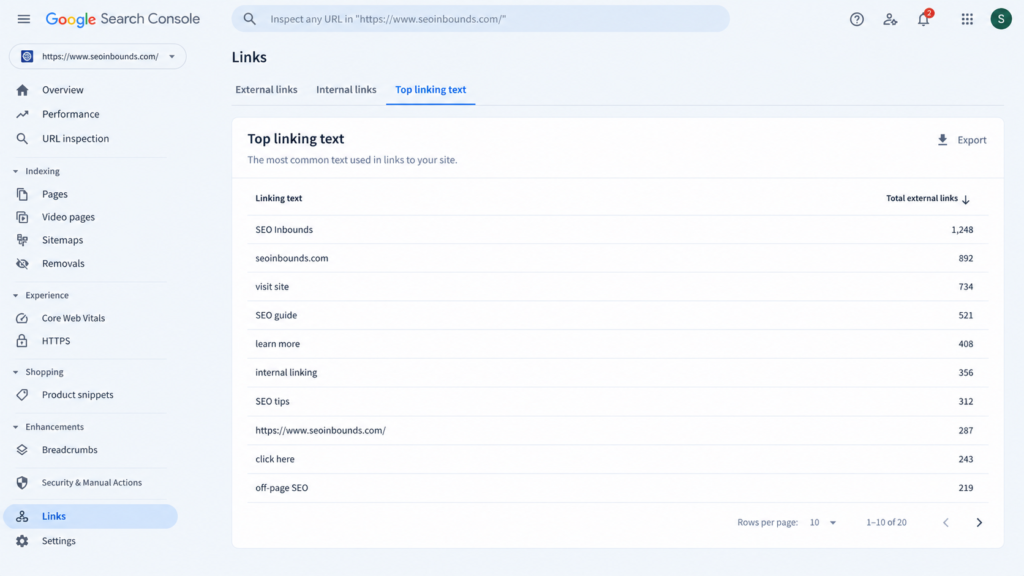
Open Google Search Console and go to the Links report. Under external links, you will find a list of top linking text, which shows the anchor text other sites use when linking to you. It is a sample, not a full list, but it is a good start. You can also add data from one of the tools in our list of free backlink checker tools to see more links.
Step 2: Label each anchor
Copy the anchors into a spreadsheet and add a column for the type: branded, naked URL, generic, partial match, exact match, or image/empty. Go through them one by one. It is slow, but you will quickly see patterns.
Step 3: Count and compare
Count how many links fall into each type and turn the counts into percentages. In a spreadsheet, a COUNTIF formula does this in seconds. Here is an example for a made-up site with a sample of 100 links:
Anchor type | Links (sample of 100) | Share | How it looks |
Branded | 38 | 38% | Healthy |
Naked URL | 17 | 17% | Healthy |
Generic | 14 | 14% | Healthy |
Partial match | 21 | 21% | Fine |
Exact match | 7 | 7% | Fine, but watch it |
Image or empty | 3 | 3% | Check the alt text |
In this example, branded anchors lead, naked URLs and generic anchors are common, and exact match is small. That looks natural. If the table showed 45% exact match and 5% branded, you would want to look closer.
Step 4: Decide what to do
- If the mix looks natural, do nothing. Keep earning links and let the pattern stay varied.
- If one phrase dominates, follow the fix list above, starting with new links that use more varied anchors.
- If you find empty or very generic anchors on your own pages, fix those first. They are the easiest wins.
Auditing your internal links
Search Console does not show internal anchor text, so use another approach. A free crawler, such as the free version of Screaming Frog (which is limited to 500 URLs), can list every internal link and its anchor text. On a smaller WordPress site, you can also search for the main phrase in the editor and check how each page links to the target.
Whatever you find, record it. Our link building tracker template is easy to adapt. Just add a column for the anchor text and its type, and you will build a history you can check each quarter.
Anchor Text by Link Source: A Quick Guide
Where a link comes from decides who writes the anchor text, which decides what you can do about it. Here is a quick reference:
Where the link comes from | Who picks the anchor | Safer approach |
Guest post you write | You | Use your brand name or the page title, not a keyword phrase |
Press release | You, and sometimes the wire service | Use the brand name or a plain URL |
Directory or profile listing | You | Use the brand name |
Forum post or comment | You | Skip keyword signatures; add real value instead |
Editorial mention in an article | The writer | Let them choose, and do not ask for an exact keyword |
Broken link replacement | The site owner | Suggest your URL; the old anchor text usually stays |
Internal link on your own site | You | Descriptive and varied, written for the reader first |
For forum posts and comments, Google’s spam policies specifically name optimized links in post signatures as a problem, so keep any forum link natural. Our guides to forum posting sites and free profile creation sites both lean on brand-name anchors for this reason. For broken link replacements, our guide to broken link building shows how to suggest your page without rewriting the other site’s content.
Common Anchor Text Mistakes
- Using the same exact match anchor for every link to a page.
- Asking site owners to use a specific keyword anchor. It is the fastest way to make a link look arranged.
- Treating published ratios as hard rules and chasing percentages instead of writing natural links.
- Using “click here” everywhere on your own site and leaving internal links with no context.
- Leaving image links without alt text.
- Pointing the same anchor text at several different pages on your own site.
- Building a pile of links in a short time that all use one phrase.
- Ignoring branded anchors. If few links use your name, that is worth fixing.
- Never checking. An audit once a quarter catches drift early.
Where Anchor Text Fits in Your Off-Page SEO Strategy
Anchor text is one small part of a larger link profile. If you are new to this area, start with what off-page SEO is and the full off-page SEO checklist. Then check whether your links pass ranking signals by reading about dofollow backlinks, and build new ones with our plan to build backlinks for free.
The honest summary: write links for people first. Make anchors clear on your own site, keep requests for backlink anchors light, and let your brand name do most of the work. Anchor text will not carry a weak page, but good, natural anchors help every other link do its job.
FAQ
What is anchor text?
Anchor text is the visible, clickable text of a link. It tells readers where the link will take them, and it gives search engines context about the page on the other side. Google also calls it link text.
Does anchor text still matter in 2026?
Yes. It still gives context to readers and to search engines. What has changed is that exact keyword anchors, repeated across many links, can look manipulative. Clear, varied, natural anchors work best.
What is a good anchor text ratio for SEO?
There is no official ratio. SEO sites that publish ranges usually describe a natural profile as mostly branded anchors, with smaller shares of naked URLs, generic anchors, and partial match, and the smallest share for exact match, often under about 10 percent. Treat those as rough guides, not rules.
Is exact match anchor text bad?
No. It is a problem only when it is overused or requested in bulk. An occasional exact match inside a natural mix is normal, and exact or near-exact anchors are common for internal links on your own site.
How do I check anchor text for free?
Use the Links report in Google Search Console to see top linking text, add data from a free backlink checker, then label each anchor in a spreadsheet and count how many fall into each type. A free crawler can show your internal link anchors.
What is over optimized anchor text?
It is a pattern where too many links use the same keyword-rich phrase, often arriving in a short period and from low-quality sources. It looks planned rather than natural. Google has not set a percentage that triggers action, so look at the overall pattern.
Can I change the anchor text on a backlink?
Only if you control the page it sits on, such as your own guest post or profile. For other sites, you can politely ask the owner, but they do not have to agree. If the pattern looks heavy, a better fix is to earn more varied links.
Is “click here” bad anchor text?
It will not get you in trouble, but it wastes a chance to add context and is unhelpful for screen reader users. A short descriptive phrase is almost always better, especially for internal links.
Does anchor text matter for internal links?
Yes. Internal links with descriptive anchors help readers find related pages and give search engines context about how your pages relate. Vary the wording slightly, and do not point the same anchor at different pages.
Should I use my keyword in every link to a page?
No. Mix it up. Use your brand name, partial match phrases, and plain descriptions as well. If using the keyword every time feels forced, that is a sign you have gone too far.