
You publish a page.
You submit the URL.
You check Google Search Console.
And there it is:
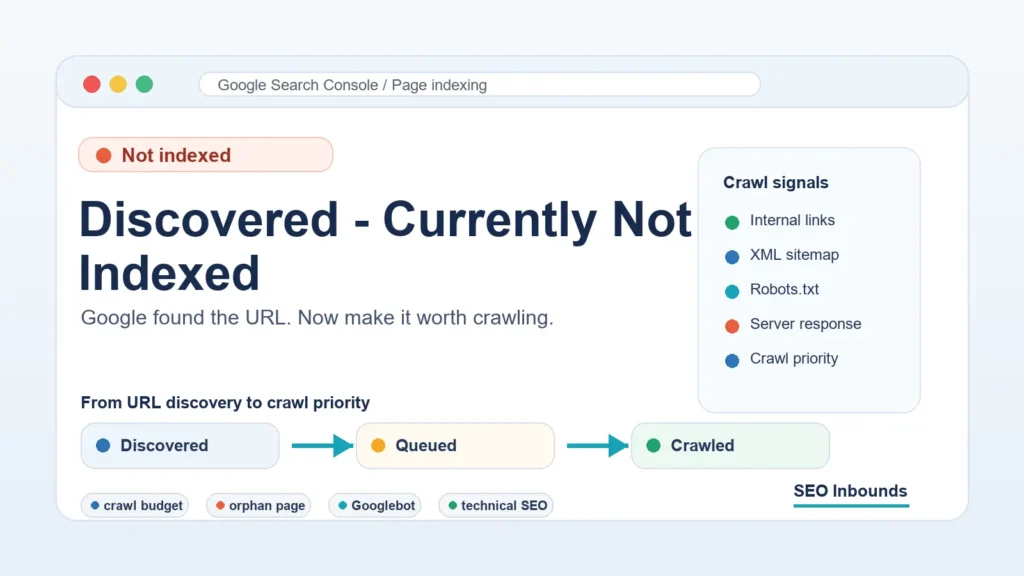
Discovered – currently not indexed
That status is annoying because it sounds like Google knows about the page but is choosing to ignore it.
Sometimes that is close to the truth.
But the exact meaning is more specific:
Discovered – currently not indexed means Google knows the URL exists, but Google has not crawled the page yet.
That is different from Crawled – currently not indexed, where Google has already visited the page and decided not to index it.
With this issue, your first job is not to rewrite the whole article.
Your first job is to make Google want to crawl the URL.
That usually means fixing crawl priority, internal links, sitemap signals, server access, or site architecture.
This guide shows you why the issue happens and how to fix it without wasting days pressing the request indexing button.
Quick Answer
Here is the short version.
| Question | Answer |
| What does Discovered – currently not indexed mean? | Google found the URL but has not crawled it yet. |
| Is the page indexed? | No. |
| Has Googlebot visited the page? | Not yet, based on this status. |
| Is it always a serious error? | No. New pages can sit here for a short time. |
| When is it a problem? | When important pages stay there for days or weeks. |
| Best first fix | Add strong internal links from relevant indexed pages. |
| Best tool to check it | Google Search Console URL Inspection tool. |
The key point:
Discovered – currently not indexed is mainly a crawling problem, not always a content problem.
Content quality still matters. But if Google has not crawled the URL yet, you first need to improve the signals that help Googlebot reach and prioritize the page.
Discovered vs Crawled: Do Not Mix Them Up
Before fixing anything, make sure you are solving the right issue.
| Search Console status | What happened | Main issue |
| Discovered – currently not indexed | Google found the URL but has not crawled it. | Crawl priority, internal links, sitemap discovery, server access, or crawl budget. |
| Crawled – currently not indexed | Google crawled the page but did not index it. | Page quality, duplicate content, canonical confusion, weak value, or poor intent match. |
If you want the full side-by-side explanation, use this guide: Discovered vs Crawled – Currently Not Indexed.
For this article, we are focusing only on one problem:
Google discovered the page, but Google has not crawled it yet.
That means your fix should focus on crawl access and crawl priority before content rewrites.
How Google Finds a URL Before Crawling It
Google does not need to crawl a page to know the URL exists.
Google can discover a URL from:
- An XML sitemap
- A link from another page
- A category page
- A homepage link
- An RSS feed
- A redirect
- An external backlink
- A previously known URL
- A submitted URL in Search Console
Discovery is just the first step.
After discovery, Google decides whether to crawl the page now, later, or not soon enough for you to notice.
That decision can be affected by crawl priority, crawl budget, internal links, site quality, server response, and how much Google already trusts the site.
So when you see Google discovered but not crawled, think:
Google knows the address. Now I need to make the page worth visiting.
Is Discovered – Currently Not Indexed Bad?
Not always.
If the page is new, this status can be normal for a short time.
Google does not crawl every new URL instantly. Even on healthy sites, indexing can take time.
But it becomes a problem when:
- The URL is important
- The page has been live for more than a few days
- The page has no internal links
- The URL only appears in the XML sitemap
- Many URLs on the site have the same issue
- Your latest posts are not getting crawled
- Search Console shows a growing number of affected URLs
If one weak tag archive is discovered but not indexed, that may not matter.
If your main article, service page, product page, or SEO landing page is stuck there, fix it.
Your goal is not to force Google to crawl every URL.
Your goal is to get your important canonical pages crawled and indexed.
12 Reasons for Discovered – Currently Not Indexed
Most fixes become obvious once you understand the cause.
Here are the common reasons Google Search Console shows Discovered – currently not indexed.
1. The Page Has Weak Internal Links
This is the first thing to check.
If a page only appears in your sitemap, Google may know it exists. But the page still looks unimportant.
Internal links are one of the strongest crawl signals on your own site.
They help Google understand:
- Which pages matter
- Which pages are related
- Which pages are part of a topic cluster
- How deep a page sits inside your site architecture
- Whether the URL is worth crawling again
If your new article has no internal links from indexed pages, it can sit in the crawl queue.
Discovered currently not indexed fix
Add internal links from relevant pages that Google already knows.
Good places to add links:
- Homepage sections
- Existing blog posts
- Topic hubs
- Category pages
- High-traffic pages
- Recently updated articles
- Related guide blocks
For example, if your new page explains Search Console indexing problems, link to it from your free URL submission to search engines guide using natural anchor text like:
Google Search Console discovered currently not indexed
Do not add random internal links just to tick a box.
Use links where a reader would genuinely want the next step.
2. The URL Is an Orphan Page
An orphan page is a page with no internal links pointing to it.
Google might discover it from your XML sitemap, but it has no real path from the rest of the site.
That creates a weak signal.
If no page on your site recommends this URL, why should Googlebot prioritize it?
This is especially common on WordPress sites when a post is published but not added to a category, hub, menu, or related content block.
How to fix it
Give the page a place in your site.
For an important article, add links from at least three relevant pages.
Use a mix of anchors:
- Discovered – currently not indexed
- Google discovered but not crawled
- Google Search Console indexing issue
- why Google has not crawled your URL
- discovered currently not indexed fix
Also link back from the new page to the supporting pages.
That two-way relationship helps create a stronger topical cluster.
3. The Page Is Only in the XML Sitemap
An XML sitemap helps Google discover URLs.
But a sitemap alone does not prove a page is important.
If a URL is submitted in the sitemap but not linked from anywhere meaningful, it may become a sitemap-only URL.
That is one of the most common reasons pages sit in Discovered – currently not indexed.
Think of it this way:
The sitemap says, “This page exists.”
Internal links say, “This page matters.”
You usually need both.
How to fix it
Check your sitemap first.
Make sure the URL:
- Uses the correct final URL
- Uses HTTPS
- Matches the canonical URL
- Does not redirect
- Does not have a noindex tag
- Has the correct trailing slash format
- Appears in the right post sitemap
- Has a fresh lastmod date after a meaningful update
Then add internal links.
If you use Rank Math or Yoast SEO, check that the page is included in the sitemap and not accidentally excluded. You can also review your plugin setup in this guide on best free SEO tools for WordPress.
4. The Page Is Too Deep in the Site Architecture
Googlebot should not need to dig through six clicks to find an important page.
If a URL is buried deep inside your site, crawl priority can drop.
This matters more for smaller sites, newer domains, and websites with many low-value URLs.
Important pages should be easy to reach from strong pages.
For example:
- Homepage to hub
- Hub to article
- Article to related article
- Category to article
- Supporting post to main guide
That is a clean path.
If the page can only be reached through page 9 of a blog archive, the signal is weak.
How to fix it
Move the page closer to the surface.
Add it to:
- A topic hub
- A category page
- A related posts block
- A main guide
- A “start here” section
- A contextual paragraph inside a relevant article
For this topic cluster, your new article should link to and from:
- Discovered vs Crawled – Currently Not Indexed
- Crawled – currently not indexed
- Free URL submission to search engines
That gives Google and readers a clear path through the indexing cluster.
5. Google Has Too Many Low-Value URLs to Crawl
Crawl budget is not only for huge enterprise sites.
Small WordPress sites can still create crawl waste.
Common examples:
- Thin tag archives
- Empty category pages
- Author archives
- Date archives
- Attachment pages
- Search result pages
- Parameter URLs
- Duplicate paginated URLs
- Old posts with no traffic or links
If Google discovers too many weak URLs, it may spend less attention on pages that actually matter.
This can cause new important URLs to stay in the crawl queue longer.
How to fix it
Clean up index bloat.
Ask this for each URL type:
Would I want this page to rank in Google by itself?
If the answer is no, consider:
- Noindex
- Canonicalization
- Redirecting
- Deleting
- Blocking internal search pages
- Improving category pages
- Consolidating thin content
Do not noindex important articles.
Use noindex for pages that should not compete in search.
The goal is to make your best pages easier for Googlebot to find.
6. The Site Is New or Has Low Crawl Trust
New websites often see Discovered – currently not indexed more often.
Google may know about your URLs but still crawl them slowly.
That does not always mean something is broken.
It can mean Google is still learning:
- How often your site publishes
- Whether pages stay live
- Whether the server is stable
- Whether the content is useful
- How your internal links are structured
New sites need patience, but not passivity.
How to fix it
Build crawl trust.
Focus on:
- Publishing fewer, better pages
- Internally linking every new article
- Keeping the sitemap clean
- Updating older posts with links to new posts
- Avoiding mass publishing thin content
- Getting relevant backlinks to important pages
If your site is in the SEO space, support your technical SEO content with related guides like what is off-page SEO and your off-page SEO checklist.
That helps the site look like a connected resource, not a pile of isolated posts.
7. The Server Response Is Slow or Unstable
Googlebot does not want to overload your server.
If your site responds slowly or throws server errors, Google can crawl less aggressively.
Server issues that can delay crawling include:
- 5xx errors
- Timeout errors
- Slow response time
- Hosting limits
- CDN misconfiguration
- Firewall blocks
- Security plugins blocking bots
- Temporary downtime
- Heavy WordPress plugins
If Googlebot sees instability, your crawl priority can suffer.
How to fix it
Check your server response.
Look at:
- Search Console Crawl Stats
- Hosting error logs
- CDN firewall logs
- WordPress security plugin logs
- Uptime monitoring
- PageSpeed Insights
- Live URL test in Search Console
Make sure Googlebot can reach the page without being blocked, challenged, or slowed down.
If your hosting is weak, do not keep publishing more pages and hoping Google catches up.
Fix the crawl access issue first.
8. Robots.txt or Security Rules Are Creating Friction
Robots.txt can stop Googlebot from crawling a page or important resources.
But the issue is not always obvious.
Sometimes robots.txt is fine, but a firewall, CDN, or security plugin creates a different kind of block.
For example:
- Googlebot gets a challenge page
- The page loads for users but not bots
- A plugin blocks unknown user agents
- The CDN rate-limits Googlebot
- Important JavaScript or CSS files are blocked
- The server returns different content to crawlers
This can make crawling less reliable.
How to fix it
Use the URL Inspection tool.
Check:
- Crawl allowed?
- Page fetch
- HTTP response
- Screenshot or rendered page
- Blocked resources
- Last crawl date
Also test your robots.txt file.
Do not block important URLs, CSS, JavaScript, or image resources that Google needs to understand the page.
If the page is important, Googlebot should be able to fetch it cleanly.
9. The Page Is New and You Are Checking Too Early
Sometimes the problem is not a problem yet.
You publish a new post.
Search Console finds it.
Then you check the report the same day.
Seeing Discovered – currently not indexed at that point is not shocking.
Google may need time to crawl and process the URL.
How to fix it
Use a simple launch routine.
After publishing:
- Confirm the URL returns 200 OK.
- Confirm the page is indexable.
- Confirm the canonical URL is correct.
- Confirm the URL is in the sitemap.
- Add internal links from 3 related pages.
- Share the page through real channels.
- Use URL Inspection.
- Request indexing once.
Then wait.
Do not request indexing every few hours.
If the page stays stuck after a few days, strengthen internal links and crawl signals.
10. The Page Looks Low Priority Compared With Other URLs
Googlebot has to choose what to crawl.
If your page has weak signals, it can lose priority to other URLs on the site.
Weak priority signals include:
- No internal links
- No external links
- No traffic
- No category support
- No hub connection
- Thin content
- Duplicate angle
- Weak title
- Old publish date with no updates
This is why a technically valid URL can still sit in Discovered – currently not indexed.
Google can access it in theory, but the URL does not look urgent.
How to fix it
Make the page clearly important.
Do this:
- Add contextual internal links
- Add the page to a relevant hub
- Mention it in a related guide
- Add a unique table or checklist
- Update the page with useful examples
- Link to it from an already indexed page
- Add it to a visible category
For SEO content, useful supporting assets matter. A practical resource like a link building tracker template can keep users engaged and help related pages feel more useful.
11. The Page Competes With Existing Content
This issue is more common with Crawled – currently not indexed, but it can also affect crawl priority.
If your site already has several similar URLs, Google may not rush to crawl another one.
Example:
- What is off-page SEO?
- Off-page SEO checklist
- Off-page SEO techniques
- Off-page SEO strategy
- Off-page SEO tools
These can all work if each page has a different job.
But if they overlap too much, Google may see the new page as less urgent.
How to fix it
Clarify the page purpose.
Every page should have one main job.
| Page type | Job |
| Definition page | Explain the concept. |
| Checklist page | Give steps to follow. |
| Template page | Give a usable asset. |
| Comparison page | Help users choose or understand differences. |
| Troubleshooting page | Diagnose and fix a specific problem. |
This article is a troubleshooting page.
It should not become a general guide to indexing, technical SEO, or backlinks.
Keep it focused on Discovered – currently not indexed and the exact crawl fixes.
12. You Requested Indexing Before Fixing the Real Issue
The request indexing button is useful.
But it is not magic.
If the URL is weak, isolated, blocked, slow, or buried, requesting indexing may not solve much.
It can help Google discover or revisit a URL faster.
But it does not guarantee crawling, indexing, or ranking.
How to fix it
Use request indexing after the basics are clean.
Before requesting indexing, confirm:
- The URL returns 200 OK
- The page is not blocked by robots.txt
- The page has no noindex tag
- The canonical URL is correct
- The page is in the XML sitemap
- The page has internal links
- The content is worth crawling
- The server responds quickly
Then request indexing once.
If nothing changes, improve the signals. Do not keep submitting the same untouched URL.
How to Check Discovered – Currently Not Indexed in Google Search Console
Use this workflow before making changes.
Step 1: Open the Page Indexing Report
In Google Search Console, open:
Indexing > Pages
Then look for:
Discovered – currently not indexed
This shows URLs Google knows about but has not crawled yet.
Do not panic if the list includes unimportant URLs.
Focus on important pages first.
Step 2: Inspect the URL
Open the URL Inspection tool.
Check:
- Is the URL on Google?
- Page fetch
- Crawl allowed?
- Indexing allowed?
- User-declared canonical
- Google-selected canonical
- Referring page
- Last crawl date
- Sitemap status
If Google has not crawled the URL, the last crawl field may be missing or old.
That supports the diagnosis: Google knows the URL exists, but the page has not been fetched yet.
Step 3: Test the Live URL
Run a live test.
Look for:
- 200 status
- No robots.txt block
- No noindex tag
- Correct canonical
- No redirect chain
- No soft 404 signal
- Page fetch success
- Mobile rendering success
If the live URL fails, fix the technical issue first.
If the live URL is clean, move to internal links and crawl priority.
Step 4: Check Internal Links
Ask:
- Does this page have internal links?
- Are those links from indexed pages?
- Are the linking pages topically relevant?
- Are the anchors descriptive?
- Is the page part of a cluster?
- Can a user reach it naturally?
If not, add links.
This is usually the fastest discovered currently not indexed fix.
Step 5: Check the Sitemap
Open your sitemap.
Check whether the URL appears there.
Then check:
- The sitemap URL is submitted
- The URL matches the canonical
- The URL is not redirected
- The URL is not noindexed
- The sitemap has a recent lastmod after a real update
Sitemap freshness helps, but it does not replace internal links.
The Best Fix Plan
Here is the order I would use.
Fix 1: Add Internal Links First
Add 3 to 5 internal links from relevant pages.
Use natural anchors.
Good anchor examples:
- Discovered – currently not indexed
- Google discovered but not crawled
- Google Search Console discovered currently not indexed
- discovered currently not indexed fix
- why Google has not crawled the URL
Avoid repeating the exact same anchor every time.
Make it read naturally.
Fix 2: Build a Small Indexing Cluster
Do not leave this article alone.
Create a cluster like this:
| Page | Purpose |
| Discovered – currently not indexed | Fix pages Google found but has not crawled. |
| Discovered vs Crawled – Currently Not Indexed | Explain the difference between both statuses. |
| Crawled – currently not indexed | Fix pages Google crawled but did not index. |
| Free URL submission to search engines | Show how to submit URLs correctly. |
| Internal linking for indexing | Show how links help crawl and indexing. |
You already have most of this cluster.
The next support article after this should be internal linking for indexing.
Fix 3: Clean Low-Value URLs
If many weak URLs are discovered, clean the site.
Common cleanup targets:
- Tag archives
- Empty categories
- Attachment pages
- Search pages
- Duplicate parameters
- Outdated thin posts
This improves crawl focus.
Do not delete pages blindly.
Review each URL type and choose the right action.
Fix 4: Improve the Page Before Requesting Indexing
Even though this is a crawling issue, the page still needs to deserve the crawl.
Before requesting indexing, add:
- A clear answer near the top
- Useful tables
- Specific examples
- A checklist
- Internal links
- A clean title tag
- A helpful meta description
- Unique insight
This is especially important in SEO niches where many pages repeat the same advice.
Fix 5: Request Indexing Once
After the page is clean and internally linked, use URL Inspection and request indexing.
Then wait.
If nothing changes, do not keep clicking.
Go back and improve crawl signals.
What Not to Do
Avoid these mistakes.
Do Not Keep Submitting the Same URL
Request indexing is not a force-index button.
If the page is isolated or low priority, repeated submission will not fix the root problem.
Do Not Build Spam Links
Random backlinks from low-quality sites are not a clean fix for a crawl problem.
If you want backlinks, build them carefully. Start with useful methods like how to build backlinks for free instead of blasting links from irrelevant pages.
Do Not Publish More Similar Articles
If your indexing cluster is already unclear, adding more similar pages can make things worse.
Publish one clear page for one clear intent.
Then internally link it well.
Do Not Noindex Important Pages Too Quickly
Noindex is for pages you do not want in Google.
If the page is important, improve it.
Use noindex for low-value archives, duplicates, or pages that should not rank.
Do Not Blame Google Before Checking Your Site
Sometimes Google is slow.
But often the page is hard to reach, poorly linked, buried, duplicated, or sitting among too many weak URLs.
Fix what you control first.
Final Checklist
Use this before you move on.
| Check | Status |
| URL returns 200 OK | Check |
| URL is indexable | Check |
| Robots.txt allows crawling | Check |
| No noindex tag | Check |
| Canonical URL is correct | Check |
| URL is in XML sitemap | Check |
| Sitemap submitted in Search Console | Check |
| Page has internal links | Critical |
| Links come from relevant indexed pages | Critical |
| Page is not an orphan page | Critical |
| Server response is stable | Important |
| Low-value URLs reviewed | Important |
| URL inspected in Search Console | Important |
| Request indexing used once after fixes | Final step |
Final Thoughts
Discovered – currently not indexed means Google found your URL but has not crawled it yet.
That is why the fix starts with crawl signals.
Do this first:
- Add internal links
- Place the URL in a real topic cluster
- Keep the XML sitemap clean
- Remove crawl waste
- Check robots.txt
- Check server response
- Use the URL Inspection tool
- Request indexing after the page is ready
If Google has not crawled the URL, do not start by rewriting 3,000 words.
Start by making the page easier to find, easier to trust, and more obviously worth crawling.
That is the cleanest path from Google discovered but not crawled to crawled, indexed, and ready to compete in search.
One practical addition: before assuming a crawl-budget problem, compare the affected URLs with indexed pages. If they have fewer contextual internal links, weaker titles, or duplicate content, improving those signals often matters more than repeatedly requesting indexing.